Excluding strings using pattern matching Sledi avtorju: alanbrod
|
|---|
alanbrod
Japonska
Local time: 22:57
japonščina - angleščina
I'm translating a number of web pages which have large numbers of images in them. Opening the html source in OmegaT, the html tags are all hidden as expected but I would also like to hide all the image filenames which of course don't need to be translated. For the occasional string there would be no problem, but the file I'm working on at the moment has a large number. Probably 50% of the segments are paths and filenames.
Is there some way to stop these being displayed in the editor... See more I'm translating a number of web pages which have large numbers of images in them. Opening the html source in OmegaT, the html tags are all hidden as expected but I would also like to hide all the image filenames which of course don't need to be translated. For the occasional string there would be no problem, but the file I'm working on at the moment has a large number. Probably 50% of the segments are paths and filenames.
Is there some way to stop these being displayed in the editor pane? They are the values of href and scr attributes and all have the form: subfolder/anotherSubfolder/filename.jpg although the depth of the path (ie the number of slashes) is not constant.
I don't want to hide the values of the title and alt attributes in the same tags. At the moment they are being displayed as separate segments so there's no problem there. ▲ Collapse
| | | |
Stepan Konev 
Ruska federacija
Local time: 16:57
angleščina - ruščina
I am not an OmegaT user but I suppose you can filter segments by this regular expression:
^(?>(?!.+\/[^\/]+\..{3,}).)*$
To this effect, press Ctrl+F, paste the regex, click Search, click Filter.
OmegaT will show you all segments that do not contain any file path.
| | | |
Stepan Konev
Ruska federacija
Local time: 16:57
angleščina - ruščina
Also you can use the following regex:
.+\/[^\/]+\..{3,}
to 'remove' all the file path segments from translation. It won't hide or literally remove them but highlight them in red. I am not sure though, but my guess is that it somehow excludes those segments from the QA or verification process.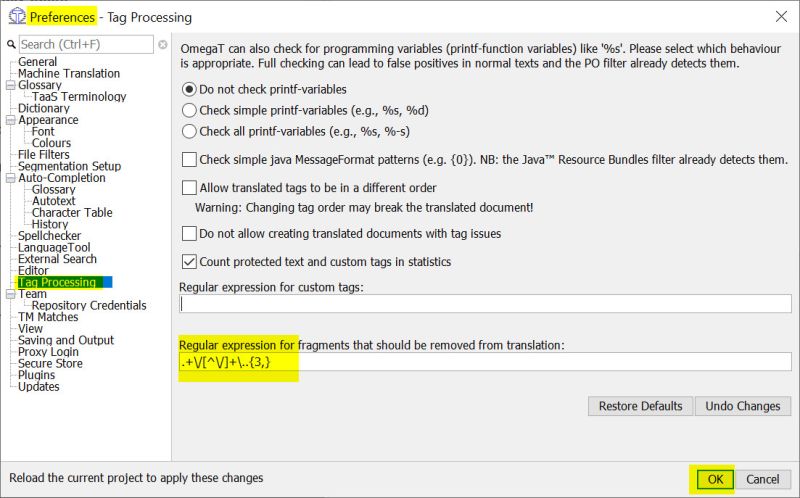
[Edited at 2022-06-11 19:04 GMT]
| | | |
alanbrod
Japonska
Local time: 22:57
japonščina - angleščina
S TEMO ZAČEL
Thank you for your quick reply.
I hadn't realised it was possible to sync the search results with the content of the editor pane.
This works well and is best for me as it totally declutters the editor.
Using the regex as suggested in the tag processing preferences doesn't seem to work as expected. It matches segments with tag end markers (eg ). Putting the regex in the Regular expressions for custom tags field works for the file paths only but greys them o... See more Thank you for your quick reply.
I hadn't realised it was possible to sync the search results with the content of the editor pane.
This works well and is best for me as it totally declutters the editor.
Using the regex as suggested in the tag processing preferences doesn't seem to work as expected. It matches segments with tag end markers (eg ). Putting the regex in the Regular expressions for custom tags field works for the file paths only but greys them out and leaves them marked purple so there is still clutter and the purple makes it more difficult to see if there are untranslated segments which need translation. ▲ Collapse
| | | |
Ta forum nima izrecno določenega moderatorja.
Obrnite se na
osebje spletišča », če bi radi sporočili prestopek proti pravilom ali pa če potrebujete pomoč.
Excluding strings using pattern matching
| Trados Business Manager Lite | Create customer quotes and invoices from within Trados Studio
Trados Business Manager Lite helps to simplify and speed up some of the daily tasks, such as invoicing and reporting, associated with running your freelance translation business.
More info » |
|
| Wordfast Pro | Translation Memory Software for Any Platform
Exclusive discount for ProZ.com users!
Save over 13% when purchasing Wordfast Pro through ProZ.com. Wordfast is the world's #1 provider of platform-independent Translation Memory software. Consistently ranked the most user-friendly and highest value
Buy now! » |
|





 Login to reply/comment
